“You got Q’s and I got A’s.” I lifted the 20-pound dumbbells and didn’t die, and that’s just one of the wins I’m unpacking in this listener Q&A. After 280-plus days of consistency, here’s what a real week of workouts actually looks like, plus my honest, complicated relationship with the scale.
I get into non-scale victories, including a wedding ring that hadn’t fit in a decade, why I dialed back from 22 hours of exercise a week to 13, and what the people in my life think about how much I train. My advice to anyone waiting to start on Monday: don’t wait.
Ask Ashley: Weights, the Scale, and Real Weeks
⚠️This podcast is for entertainment purposes only and is not medical advice. Please consult a healthcare professional before starting any diet or exercise program.⚠️
The Fastest Way to Quit Working Out (Don’t Do This)
“So you want to know the fastest thing that’s going to make you quit working out? I’ll tell you.” If you’ve started a routine only to abandon it three weeks later, Rylie Teeter, CEO at Teeter, has one no-nonsense piece of advice for anyone in their 40s trying to make it stick.
I follow it up with exactly why group fitness and great music changed everything for me. Short episode, straight talk, the kind of advice you’ll actually remember next time you want to bail.
Don’t Make This Mistake
⚠️This podcast is for entertainment purposes only and is not medical advice. Please consult a healthcare professional before starting any diet or exercise program.⚠️
Your Fitness Doesn’t Have to Take a Vacation When You Do
“Maybe the truth is you just need a plan.” Packing your bags doesn’t mean packing in your progress. I’m breaking down my actual plan for staying active on a road trip to Florida: bodyweight workouts, resistance bands, and a deck-of-cards exercise trick I picked up at a boot camp years ago.
I also get into how my husband and I handle road trip eating without torching every good habit we’ve built, including a meal-splitting strategy that just makes sense. Trip coming up, or just need ideas for working out without a gym? This one’s for you.
Fitness on the Road, No Gym Required
⚠️This podcast is for entertainment purposes only and is not medical advice. Please consult a healthcare professional before starting any diet or exercise program.⚠️
A Letter to the Version of Me Who Was Afraid to Start
“What would you say to the younger version of yourself?” Two years ago I was terrified to walk back into a gym and convinced dieting was my only option. Now, 280-plus days into this, I’m writing that version of me a letter, and it might be exactly what you need to hear today too.
From lifting 3-pound dumbbells to reaching for the 20s, I get honest about the pain, the cravings, and the moments I wanted to quit, plus why I’m so glad I didn’t. If you’ve been waiting for the right moment to start moving, this is it.
The Letter I’d Write My Past Self
⚠️This podcast is for entertainment purposes only and is not medical advice. Please consult a healthcare professional before starting any diet or exercise program.⚠️
Drop It, Keep It, Add It: Eating Better Without the Guilt
“What should you drop, what should you keep, and what should you add? Let’s talk about it.” Personal trainer and lifelong bodybuilder Virginia Kinkel breaks down her Drop Keep Add framework, and it might be the most realistic approach to eating better you’ve ever heard. No cutting everything you love, just knowing what to swap.
I react in real time, fresh off a week of way too many sweets and some unsolicited opinions from people in my life about what I should and shouldn’t be eating. We get into the 80/20 principle, strength training for women over 40, and why deprivation always backfires. Giving yourself grace is not the same thing as giving up.
Eat Better Without Cutting Everything Out
⚠️This podcast is for entertainment purposes only and is not medical advice. Please consult a healthcare professional before starting any diet or exercise program.⚠️
“Well, Ashley, what shoes did you go with?” I finally landed on the ASICS Women’s NOVABLAST 5 after a mad dash to replace a pair that fell apart, and I’m spilling why I made that call fast, plus why I’m still not done shopping. Turns out being hard on shoes means you need a backup plan before urgency takes over.
I’m still curious about the Brooks Ghost and Adrenaline, and fully prepared to keep testing shoes in the name of finding the best one. Plus some fun news: my husband and I are celebrating our 20th wedding anniversary at Gen Con, the largest tabletop gaming convention in North America, and it’s about to lead to some very fun fitness content.
Which Shoes Actually Won?
⚠️This podcast is for entertainment purposes only and is not medical advice. Please consult a healthcare professional before starting any diet or exercise program.⚠️
Stop Making Excuses. Start Making Appointments With Yourself.
Wrong outfit. Ate too big of a breakfast. Woke up five minutes late. If you’ve talked yourself out of a workout with reasons that wouldn’t survive any real scrutiny, I used to run the exact same mental gymnastics.
Here’s what flipped it for me: I started blocking my workout classes on my calendar like client appointments, because that’s exactly what they are. If you’re still treating workouts as optional, this episode hands you a new way to show up for yourself, one calendar invite at a time.
Book Yourself Like a Client
⚠️This podcast is for entertainment purposes only and is not medical advice. Please consult a healthcare professional before starting any diet or exercise program.⚠️
Learn how to start a free podcast from your car in 30 days. Just your phone, a free RSS.com account, and a parking lot. No gear. No tech skills. Let’s go.
I want to tell you something real quick before we get into all the steps. I recorded my podcast More Movement Please from my car. Not because I had to. Because it turned out that a parked car is actually one of the best recording environments you’ll ever find. Soft surfaces everywhere. No echo. No one walking through to ask what you want for dinner.
I’ve been podcasting since April Fool’s Day 2020. (I launched on that date on purpose so I could deny the whole thing if it tanked.) I’ve hosted three shows. I’ve been to Podcast Movement conferences. And in October 2025, I started fresh with nothing but my phone and a free account.
This whole series is me showing you how I did it, and how you can do the exact same thing.
Full disclosure: I’m a proud brand ambassador, affiliate, and social media content strategist for RSS.com, the podcast hosting platform I’ve personally used since April 2020. I only recommend what I actually use. If you sign up for a paid plan through my link, I earn a small commission at no extra cost to you. Thank you for supporting my work!
Before you read another word, watch these. The first one shows you exactly how I launched a podcast from my car. The second walks you through setting up your free account on RSS.com step by step. These two videos will get you 80% of the way there on their own.
I broke everything down into 30 short daily videos so it doesn’t feel overwhelming. Each one is a single topic. You watch, you do the thing, you come back tomorrow. That’s it. Those will start rolling out April 7 as part of Pat Flynn’s 14-day video challenge! Yes, I know – I filmed 30…but this was under the assumption his Q2 challenge would also be 30 days 😅
That said, don’t let the 30-day label fool you.
🚀 You Could Launch This Weekend If You Wanted To
The 30-day format is great if you want to go one step at a time. But if you’re the type of person who just buckles down and batches through things, you could run through all of this content in a weekend and have your podcast live before Monday. Seriously. The steps don’t change. Only the pace does.
Below is what the full 30 days covers. Prefer to watch? Check out the playlist:
Days 1–7: Get Clear and Get Ready
This first week is all about figuring out the basics before you ever hit record. Your topic, your audience, your name, and how podcast hosting works. This is the foundation. It’s also where most people spend way too long, so I’m going to help you move through it fast.
Plain-English explanation of what it is and why you need one.
Day 7
Wait, It’s Actually Free?
Exactly what’s included in the RSS.com Free Local and Niche plan.
💡 Quick Note on the Free Plan
The RSS.com Free Local and Niche plan is genuinely free. No credit card required to sign up. No trial period that quietly flips to a charge. You get unlimited episodes, distribution to Spotify and Apple Podcasts, a free podcast website, and 24/7 customer support. That’s what you’re building on.
Days 8–14: Set It All Up
Week two is setup week. This is where you get everything in place so when it’s time to record, there’s nothing in your way. Distribution. Audio quality. Cover art. Your podcast website. By the end of day 14, your show will exist. It just won’t have episodes yet.
It goes live automatically the second you publish. No coding. Ever.
Day 12
The Feature That Finds Listeners While You Sleep
Why automatic transcripts are one of the smartest things you can use for discoverability.
Day 13
Why 2026 Is the Best Time to Start
People want real human voices more than ever right now. Yours included.
Day 14
Week 2 Recap
A quick check-in before you move into recording mode.
A quick word on podcast editing, because it’s probably the thing you’re most nervous about: you don’t need to do much of it when you’re just starting out. Adobe Podcast’s free Enhance Speech tool handles background noise, balances your levels, and makes your audio sound clean before you ever upload anything. That covers 90% of what editing actually needs to do. You’re not making a BBC documentary. You’re making a podcast. Record it, enhance it, upload it, done.
Days 15–21: Record and Launch
This is the fun part. Or the scary part, depending on how you look at it. Either way, by the end of this week you’ll have recorded your first episodes and hit publish. That’s the whole goal.
Day
Topic
What You’ll Do
Day 15
How Long Should Episodes Be?
The answer is probably shorter than you think.
Day 16
Script vs. Wing It
Three formats and how to figure out which one fits your style.
Day 17
Where Episode Ideas Come From
My actual idea pipeline and how to build yours.
Day 18
Recording Your First Episode
What to say, how to open, and how to close with a strong call to action.
Day 19
How to Upload and Publish
Full walkthrough of getting your episode live on RSS.com.
Day 20
Why I Film 5 Videos a Day
The batching method that keeps your schedule alive even when life gets weird.
Day 21
What I Wish Someone Had Told Me
Real talk from someone who’s been podcasting since 2020.
Days 22–30: Grow and Keep Going
Your show is live. Now what? This last stretch is all about momentum. Promoting your show, understanding your numbers, staying consistent, and building an audience that actually keeps coming back.
Day
Topic
What You’ll Do
Day 22
How to Promote Your Show
Simple strategies that don’t need a big following to start working.
Day 23
Your Podcast Website as a Marketing Tool
How your free site can actively help you grow your audience.
Day 24
Make Money Podcasting
There are so many ways to make money as a podcaster. See them all here.
Day 25
Building an Audience From Zero
What to do before and right after you launch.
Day 26
Podcasting 2.0 Features
Chapters, live streaming, value for value, and more stuff most new podcasters don’t know about.
Day 27
What I Did When Nobody Was Listening
Honest talk about early numbers and how to push through them.
Day 28
Consistency Without Burning Out
How to stay on schedule without making podcasting feel like a second job.
Day 29
What Comes After Your First 10 Episodes
How to evaluate, adjust, and keep building momentum.
Day 30
Your Podcast Exists. Now What?
The final parking lot pep talk. And why starting was the hardest part.
Got Questions About Starting Your Show?
Send them my way! I read every question and use them to create more content. Stuck on your podcast name? Not sure how to structure an episode? Confused about something technical? Ask me anything.
The free plan will genuinely get you started and keep you going for a long time. But at some point, you might want more. I made a full video breaking down exactly when paying makes sense, what you actually get for your money, and whether it’s worth it for where you are right now.
Watch it before you decide anything. No pressure either way.
▶ Video 3 — Why You Should Pay for Podcast Hosting (And When)
What Upgrades Actually Do For You
When you’re ready to grow, a paid plan on RSS.com adds some features that are worth the money. The biggest one for me is automatic AI-powered transcripts. Google can’t listen to your podcast, but it can read a transcript. That means your episodes can show up in search results when someone is looking for exactly what you talk about. I used to pay $8.99 a month separately just for transcripts. Now it’s included in the plan.
You also get PodViz, which turns your audio episodes into videos you can push straight to YouTube. Detailed analytics. Apple Podcast Subscriptions. The ability to run multiple shows from one dashboard. Paid plans start at $11.99 a month on an annual plan.
Start free. Get some episodes out. See how you like it. Then decide. There’s no rush and no pressure. Your episodes won’t go anywhere, and RSS.com won’t hold your content hostage if you ever want to switch things up. That’s actually one of the reasons I’ve stayed with them since 2020.
Questions I Get All the Time:
Do I need a microphone to start a podcast? Nope. Your phone’s built-in mic is enough to get going. If you want one upgrade, a clip-on lavalier mic from Amazon runs about $20 and makes a noticeable difference. But buy it after your first episode is live, not before.
How many episodes should I record before I launch? At least three. One gives listeners nothing to binge. Three gives them a reason to subscribe. If you can batch five before launch, even better.
Does my podcast have to sound perfect? No. It has to sound clear enough that people aren’t distracted by the audio quality. Adobe Podcast gets you there for free. Perfect is the enemy of published.
Can I really do this from my phone? I did it. From a parking lot. With a six-year-old phone. Yes.
✅ Your Podcast Launch Checklist
Print this out, save it, screenshot it. Work through it at whatever pace feels right. Every box you check is one step closer to your first episode being live.
Before You Record Anything
Decide on your podcast topic and what makes it different from other shows
Define who your listener is (be as specific as possible)
Pick a name that’s clear, easy to say, and sounds like you
Write a one-sentence description of your show
Brainstorm your first 10 episode topics
Decide on your episode format: solo, interview, or co-hosted
Decide how long your episodes will be
Set Up Your Account
Create your free account at RSS.com(no credit card needed)
Create your cover art in Canva (3000 x 3000 px, readable at thumbnail size)
Write your show description
Set up your podcast and upload your cover art
Connect distribution so your show goes to Spotify, Apple Podcasts, and Amazon Music automatically
Check that your free podcast website is ready to go
Record Your First Episodes
Download the free Voice Memos app (already on your iPhone) or similar on Android
Find a quiet spot (your car works great)
Outline your first episode: one topic, three to five points, a strong opening line, and a call to action
Record your first episode
Run it through Adobe Podcast’s free Enhance Speech tool to clean up the audio
Record at least two more episodes before you launch (so new listeners have something to binge)
Set your publish date and schedule at least two more episodes
Tell people it’s live. Post about it. Text your people. Make some noise.
Reply to every comment and message from your first listeners
Keep Going
Batch record your next round of episodes instead of recording one at a time
Check your analytics after your first month to see what’s resonating
Write basic show notes for each episode and publish them on your podcast website. Google can’t listen to your show, but it can read your show notes. This is free SEO and most new podcasters skip it entirely.
Start building your episode idea list so you never feel stuck
Engage with your listeners and ask them what they want more of
Decide whether a paid plan makes sense for where your show is heading
Send me your questions anytime. I genuinely love hearing from people who are building their shows.
Your podcast doesn’t have to be perfect. It doesn’t need a fancy intro or a studio or a microphone that costs as much as a car payment. It needs a topic, a phone, a free account, and you deciding to start.
Go park somewhere quiet and hit record. And when your show is live, drop the link here. I want to be one of your first listeners. I mean that.
Painting my toenails used to be a workout. Now it’s just an average Monday, and that shift is worth celebrating on its own. I’m a self-described pessimist actively learning to flip the script, and tracking wins that have nothing to do with the scale has been the real secret behind 270-plus days and 550-plus workouts.
These are the moments that don’t show up on any fitness app: getting up a flight of stairs without stopping, reaching your feet without a whole production. If you’ve been waiting for permission to celebrate how far you’ve come, or to just get started, this is it.
Celebrate the Wins the Scale Can’t See
⚠️This podcast is for entertainment purposes only and is not medical advice. Please consult a healthcare professional before starting any diet or exercise program.⚠️
You don’t need 50k followers to launch creator merch. Screen printing expert Joe from Tee Vision breaks down how to start small, spend smart, and sell to the audience you already have.
Why 500 Loyal Fans Beat 50,000 Followers When It Comes to Creator Merch
One of the most common things I hear from content creators and bloggers is some version of this: “I’ll think about merch once I hit 50k followers.” And, every time I hear it, I want to tell them the same thing – That’s the wrong way to think about it.
I’ve been working with creators, nonprofits, and small businesses at Tee Vision Printing since 2014. And, the number that matters far more than your follower count is trust.
A blogger with 500 die-hard readers who buys everything they recommend will outsell an influencer with 50,000 followers who scrolls past everything.
Start way smaller than you think you need to
The number one mistake creators make is overcommitting before they know what their audience actually wants. Spending months on a complicated four-color design, ordering 200 units, and then realizing their readers would have loved a tote bag instead. It happens all the time.
My advice? Start with one product, one design, one colorway. Get a quote for 48 units. That’s the sweet spot where the per-unit cost becomes reasonable without needing to sell to every person you’ve ever met on the internet.
Before you spend a single dollar, ask your audience directly. Send an email, post a poll, put it in your Instagram stories. “Would you buy a hoodie with this design?” It costs you nothing and tells you everything.
Screen printing vs. print-on-demand: what you actually need to know
Print-on-demand services are a genuinely great option in certain situations. No upfront costs, no inventory, no risk. But here’s what most creators don’t think about: the real cost difference at volume.
A hoodie that costs $18 to produce through screen printing at 48 units can run $35 to $40 through POD. That difference either eats your margin or gets passed to your audience at a higher price.
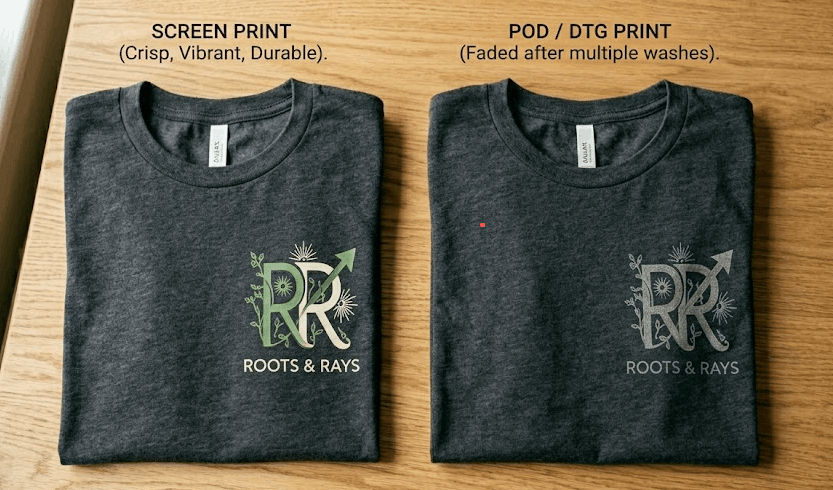
The quality difference is real too. Screen printed ink is pressed into the fabric and lasts after washing. DTG and POD prints sit on top of the fabric and tend to fade faster. If you want your audience wearing your merch years from now and telling other people about it, that matters.
Screen printing makes more sense when:
You’re launching merch around a specific event, podcast milestone, or brand moment and you have a rough sense of how many units you need
You want to give your audience something premium and lasting instead of something that looks like it came from a generic print store
You’ve done the math and the per-unit savings at 48 or more pieces make screen printing cheaper than POD
POD is still the right call when you genuinely have no idea how many units you’ll move and you’re not ready to commit to a minimum order. Both tools are valid. The key is knowing which situation you’re actually in.
The real secret to merch that actually sells
The merch that sells isn’t always the most elaborate design. It’s the design that means something to your specific community.
Think about the inside jokes from your content, the phrases your listeners repeat back to you, the things only your most loyal followers would recognize. A shirt that a stranger wouldn’t understand but your biggest fans would immediately love? That’s the shirt that gets worn outside, photographed, and shared.
People don’t buy creator merch because the design is objectively gorgeous. They buy it because wearing it feels like belonging to something. That’s what you’re really selling.
How to actually get started
Here’s the practical breakdown for getting started even with a smaller audience:
Pick one product your audience actually uses. Hoodies and totes travel the most. Mugs and hats have their loyal fans too.
Design for recognition, not beauty. Simple and meaningful beats complex and generic every time.
Order 48 units and pre-sell first. If you sell out in pre-orders, you know exactly how many to reorder and you cover your costs before the shirts even ship.
Find a printer who asks questions before taking your money. The best print shops ask more questions than you’d expect about your goals, your audience, and your event. That’s always a good sign.
Your audience doesn’t need to be huge. It just needs to be yours.
If you’re curious about working with our team, you can check out our screen printing services in Philadelphia, and see if you feel like we’re a good fit for what you’re building.
About the Author
Joe Carpentero has worked with Tee Vision Printing, a Philadelphia-based custom screen printing shop serving creators, nonprofits, businesses, and community organizations since 2014.